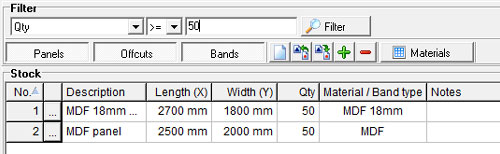
The meaning of each button on the buttons bar is as follow: |
- Panels button - when checked
 panels are displayed in the stock grid; when unchecked
  panels are not displayed in the stock grid
- Offcuts button - when checked
 offcuts are displayed in the stock grid; when unchecked
  offcuts are not displayed in the stock grid
- Bands button - when checked
 bands are displayed in the stock grid; when unchecked
  bands are not displayed in the stock grid
 New - to create an empty stock and clear the existing Stock list.
 Import - to import stock data from a .CSV
file
Import - to import stock data from a .CSV
file
 Export - to export the stock list to a .CSV file
 Add new - to insert a new record after the selected
row in the grid
Add new - to insert a new record after the selected
row in the grid
 Delete - to delete the selected row(s) in the grid
 |
WARNING! - Please make sure you have a backup copy (i.e. a CSV file export)
of the stock data before using the "New" ,
"Import"
and "Delete"
functions. Once performed, these operations can not be undone! |